We have gone from a setup which did the Site to Site VPNs via a Azure VPN Gateway as well as the Point to Site VPNs.
We are migrating to a Fortigate in Azure to give Users a static IP Outbound. We will Migrate Site to Site VPNS to this also.
We want to keep the Azure VPN Gateway for Point to Site as the Client supports SAML and also you don’t need to pay for the client upgrades like you do with Fortigate
Setup Fortigate via Marketplace – See this for what you have to to https://pariswells.com/blog/research/errors-when-deploying-azure-fortigate-from-marketplace-in-azure
For example you’ve set the internal IP Fortigate to 10.5.6.4
You will need to setup 2 new Routes
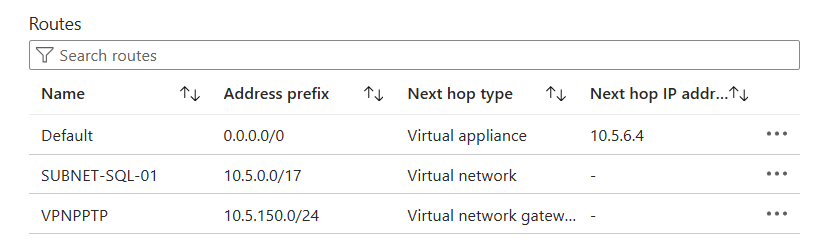
A route that attaches to your Server Subnets routes all traffic apart from Local Traffic to Fortigate
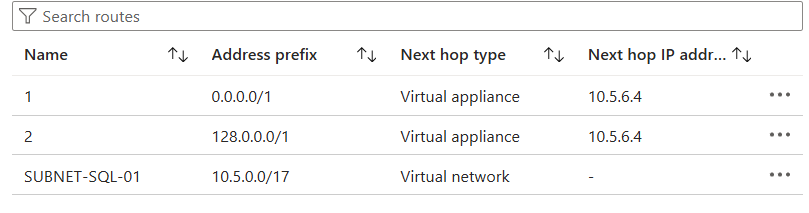
A Route for the Azure VPN Gateway Subnet that Routes ALL Traffic to Fortigate. You have to divide the Subnet by 2 as a Route Table on the Gateway Subnet Doesn’t support 0.0.0.0/0
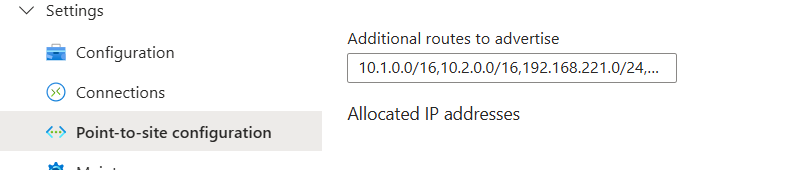
On the VPN Gateway you will want to add all the Routes to any Site to Site VPNs
Push the PPTP Subnet Back to Internal Port on the Fortigate

For Users that want to have their outbound internet via Fortigate for Static IP you will need to deploy new Azure VPN Config with the below Added
 <includeroutes>
      <route>
          <destination>0.0.0.0</destination><mask>1</mask>
      </route>
      <route>
          <destination>128.0.0.0</destination><mask>1</mask>
      </route>
  </includeroutes>