Enterprise app
Identifier : https://xxxxxxx:10428/remote/saml/metadata
Reply URL : https://xxxxxxx:10428/remote/saml/login
Signon : https://xxxxxxx:10428/remote/saml/login
Logout : https://xxxxxx:10428/remote/saml/logout
Attribute Claim
username -> user.userprincipalname
Change Cert to
Sign SAML response and assertion
Forti -> User and Auth -> Single Sign on
New SSO called “saml”
address : xxxxxxxxx:10428
Prefils the next 3
Change Cert to Forti Factory
IDP ENtity ID : https://sts.windows.net/
Login : https://login.microsoftonline.com/
Logout : https://login.microsoftonline.com/
Cert Remote Cert 2 ( Upload from SAML )
Attribute used to identify users : username
Attribute used to identify groups : group
config user saml
###No trailing / and https
set entity-id "https://xxxxxxx:10428/remote/saml/metadata"
config system global
set auth-ike-saml-port 10428
end
config system interface
edit "wan1"
set ike-saml-server "saml"
next
end
config user group
edit "VPN-SAML-Users"
set member "saml"
next
end
config vpn ipsec phase1-interface
edit "IPsec-SAML"
set authusrgrp "VPN-SAML-Users"
next
end
Forti -> User and Auth -> Authentication Settings -> Cert to Lets Encrypt
config vpn ipsec phase1-interface
edit "IPsec-SAML"
set ipv4-split-include "IPSEC-Split"
set type dynamic
set interface "port1"
set ike-version 2
set authusrgrp "VPN-SAML-Users"
set net-device disable
set mode-cfg enable
set ipv4-dns-server1 10.1.1.4
set ipv4-dns-server2 10.1.1.5
set proposal aes256-sha256
set dpd on-idle
set dhgrp 20
set eap enable
set eap-identity send-request
set ipv4-start-ip 10.212.134.150
set ipv4-end-ip 10.212.134.250
set client-auto-negotiate enable
set client-keep-alive enable
set psksecret XXXXXXXXX
set dpd-retryinterval 60
next
end


config vpn ipsec phase2-interface
edit "IPsec-SAML"
set phase1name "IPsec-SAML"
set proposal aes256-sha256
set dhgrp 20
set replay disable
next
end
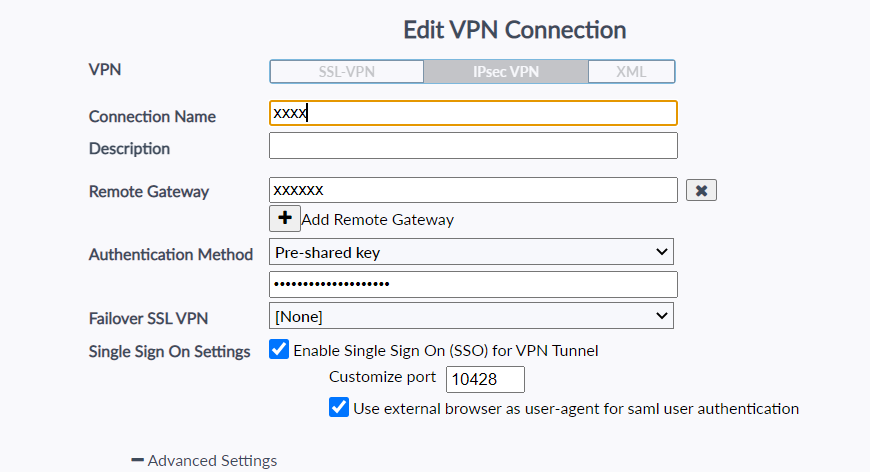
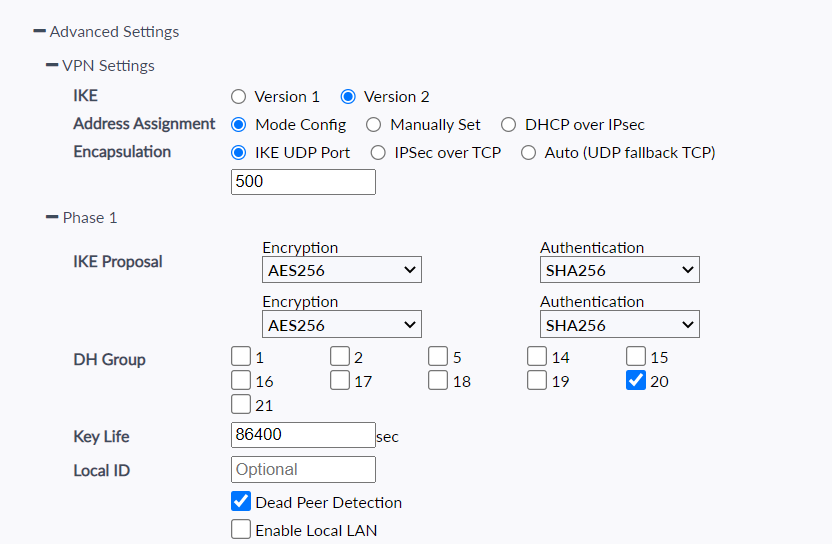
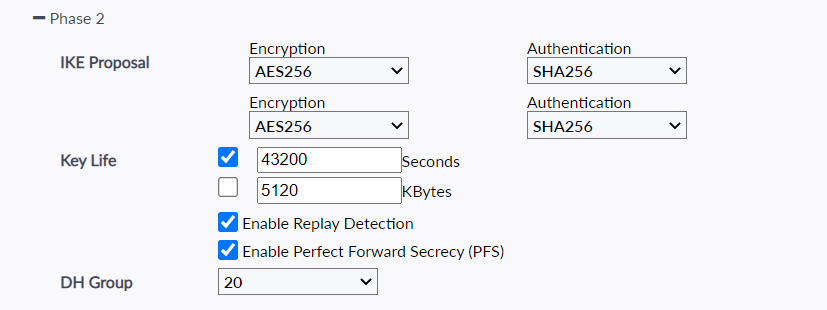
FortiGate IPsec VPN with SAML — Andrew Travis
https://www.reddit.com/r/fortinet/comments/1rrsdmv/ipsec_saml_works_at_home_but_not_on_hotspots/
SAML IPSEC ERR_EMPTY_RESPONSE
This will happen if your carrier is using CGNAT ( Changing Public IPS like 4g ) or via Internal Technical Tip: Getting ERR_EMPTY_RESPONSE when connecting to IPSec SAML and users are inside the internal network | Community
Fortinet Guide
Registry Key to backup IPSEC ( Dont do this won’t bring over the right PSK Key )
HKEY_LOCAL_MACHINE\SOFTWARE\Fortinet\FortiClient\IPSec
Website with Existing Config
https://docs.google.com/spreadsheets/d/1QgMkKxQQINvPLsXQyRRb3QqWmRizXpt-xOLvMxfw9F8/edit?gid=0#gid=0
Powershell to Add config to existing
“IPSEC-Split” Needs to be an address Group with all Local Subnets
VPN
cmd /c FCConfig -m all -f ipsecconfig.xml -o export -i 1 -p password123
2. have the ipsecconfig.xml as zip file and below script in one folder. run it.
# Define the folder path where the FortiClient VPN configuration files will be stored
$folderPath = “C:\ProgramData\fortiVPNConfig”
# Delete the existing configuration folder and all its contents (if it exists)
Remove-Item -Path $folderPath -Recurse -Force
# Extract the contents of config.zip into C:\ProgramData\fortiVPNConfig, overwriting existing files if needed
Expand-Archive “config.zip” -DestinationPath C:\ProgramData\fortiVPNConfig -Force
# Define the destination folder path
$destinationPath = “C:\ProgramData\fortiVPNConfig”
# Set the folder attribute to Hidden so it is not visible in File Explorer by default
Set-ItemProperty -Path $destinationPath -Name Attributes -Value ([System.IO.FileAttributes]::Hidden)
# Change to the folder containing the FortiClient configuration XML file and Launch FCConfig.exe and import the VPN configuration from config.xml
Set-Location “C:\ProgramData\fortiVPNConfig\config\config”; Start-Process -FilePath “C:\Program Files\Fortinet\FortiClient\FCConfig.exe” -ArgumentList @(“-m”,”all”,”-f”,”ipsecconfig.xml”,”-o”,”import”,”-i”,”1″,”-p”,”password123″) -Wait