 Recently I was trying to insert a new image in an email signature for a user , however when I inserted the image it reduced the width which changed the resolution of the signature to an unreadable format. This is due to the fact outlook tries to resize the image to the width of an A4 page. There is no where in outlook 2007 to change the size of the image. To change the image back to its original 2
1) Find the sinatures HTM File , this will be in C:\Documents and Settings\”Your Username”\Application Data\Microsoft\Signatures
2) Open ( The name of the signature).htm with Microsoft Word
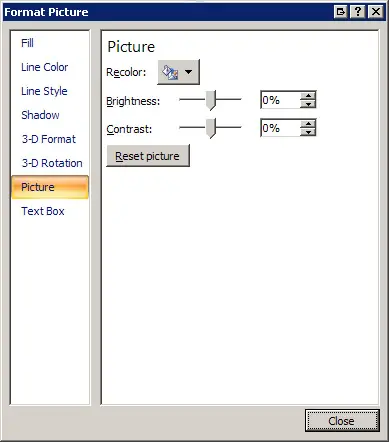
3) Right click on the image , click format , select Picture tab and choose Reset Picture
4) Save the file an this will change the signature back to its original size!
Recently I was trying to insert a new image in an email signature for a user , however when I inserted the image it reduced the width which changed the resolution of the signature to an unreadable format. This is due to the fact outlook tries to resize the image to the width of an A4 page. There is no where in outlook 2007 to change the size of the image. To change the image back to its original 2
1) Find the sinatures HTM File , this will be in C:\Documents and Settings\”Your Username”\Application Data\Microsoft\Signatures
2) Open ( The name of the signature).htm with Microsoft Word
3) Right click on the image , click format , select Picture tab and choose Reset Picture
4) Save the file an this will change the signature back to its original size!
Outlook 2007 Resizing Images for Email Singatures
Recently I was trying to insert a new image in an email signature for a user , however when I inserted the image it reduced the width which changed the resolution of the signature to an unreadable format. This is due to the fact outlook tries to resize the image to the width of an A4 page. There is no where in outlook 2007 to change the size of the image. To change the image back to its original 2
1) Find the sinatures HTM File , this will be in C:\Documents and Settings\”Your Username”\Application Data\Microsoft\Signatures
2) Open ( The name of the signature).htm with Microsoft Word
3) Right click on the image , click format , select Picture tab and choose Reset Picture
4) Save the file an this will change the signature back to its original size!