 I was recently trying to setup a users home Windows Vista machine up for Terminal Services Web Access through the Active-X Control. Upon installing the Active X control I was given an error about the version for RDP.
To find out the version of Remote Desktop Connection on your computer , open the Remote Desktop Client by clicking on Start , then in the Run or Search field then type mstsc and enter
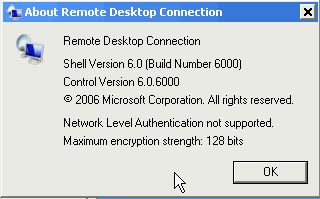
Now in the top left of the Remote Desktop Connection box , press the computer icon once , then click about. This machine only had Version 6.0.6000 which is the version Windows Vista comes with. Vista Service Pack 1 updates this to Version 6.0.6001 , which supports RDP 6.1 and the Terminal Services Web Access.
I was recently trying to setup a users home Windows Vista machine up for Terminal Services Web Access through the Active-X Control. Upon installing the Active X control I was given an error about the version for RDP.
To find out the version of Remote Desktop Connection on your computer , open the Remote Desktop Client by clicking on Start , then in the Run or Search field then type mstsc and enter
Now in the top left of the Remote Desktop Connection box , press the computer icon once , then click about. This machine only had Version 6.0.6000 which is the version Windows Vista comes with. Vista Service Pack 1 updates this to Version 6.0.6001 , which supports RDP 6.1 and the Terminal Services Web Access.
Vista and RDP Versions for Terminal Services Web Access
I was recently trying to setup a users home Windows Vista machine up for Terminal Services Web Access through the Active-X Control. Upon installing the Active X control I was given an error about the version for RDP.
To find out the version of Remote Desktop Connection on your computer , open the Remote Desktop Client by clicking on Start , then in the Run or Search field then type mstsc and enter
Now in the top left of the Remote Desktop Connection box , press the computer icon once , then click about. This machine only had Version 6.0.6000 which is the version Windows Vista comes with. Vista Service Pack 1 updates this to Version 6.0.6001 , which supports RDP 6.1 and the Terminal Services Web Access.
 (No Ratings Yet)
 Loading...