
If you set up a user on Google Apps or Gmail and link it to their Blackberry Internet Services the user will get a copy of each sent item in their inbox. This can get frustrating however never fear , there is a simple fix. Luckily Blackberry Internet Services comes with a filter for incoming messages
Log into your BIS account through any one of these links depending on your provider
T-Mobile:
BlackBerry Internet Service Tmobile (U.K)
Vodafone :
Blackberry Internet Services Vodafone UK
Orange :
Blackberry Internet Services Orange UK
O2 :
Blackberry Internet Services 02 UK
Log in with your username and password , if you already haven’t done this you can create a new account using your Devices Pin ( Found in Options then Status )
Select the Gmail or Google Apps Email Account from the list , and select the filters button

Edit the filter options below to discard any messages from yourself
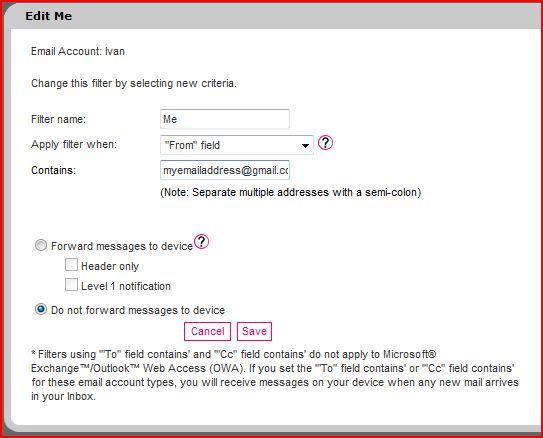
Save and your done!

 Loading...